Rapid Prototyping
Read time:
5 min
Client:
Class Project
Industry:
Interaction Design
Start:
October 8, 2025
End:
October 15, 2025
Duration:
1 Week
This rapid prototyping project reimagined a single but essential workflow in Canvas: updating a user profile bio and link, then navigating back to view the changes. Through think-aloud usability tests of the existing Canvas interface, I mapped user pain points, redesigned the task flow, and built a new wireflow prototype addressing issues of visibility, navigation clarity, and error prevention.
The project demonstrates my ability to apply usability testing, task-flow design, and rapid prototyping under strict constraints (1024×768 screens, limited color palette, no animations, and click-only interactions). The redesigned experience offers a clearer, more consistent path for users completing this everyday Canvas task.
Starting point
Starting Point
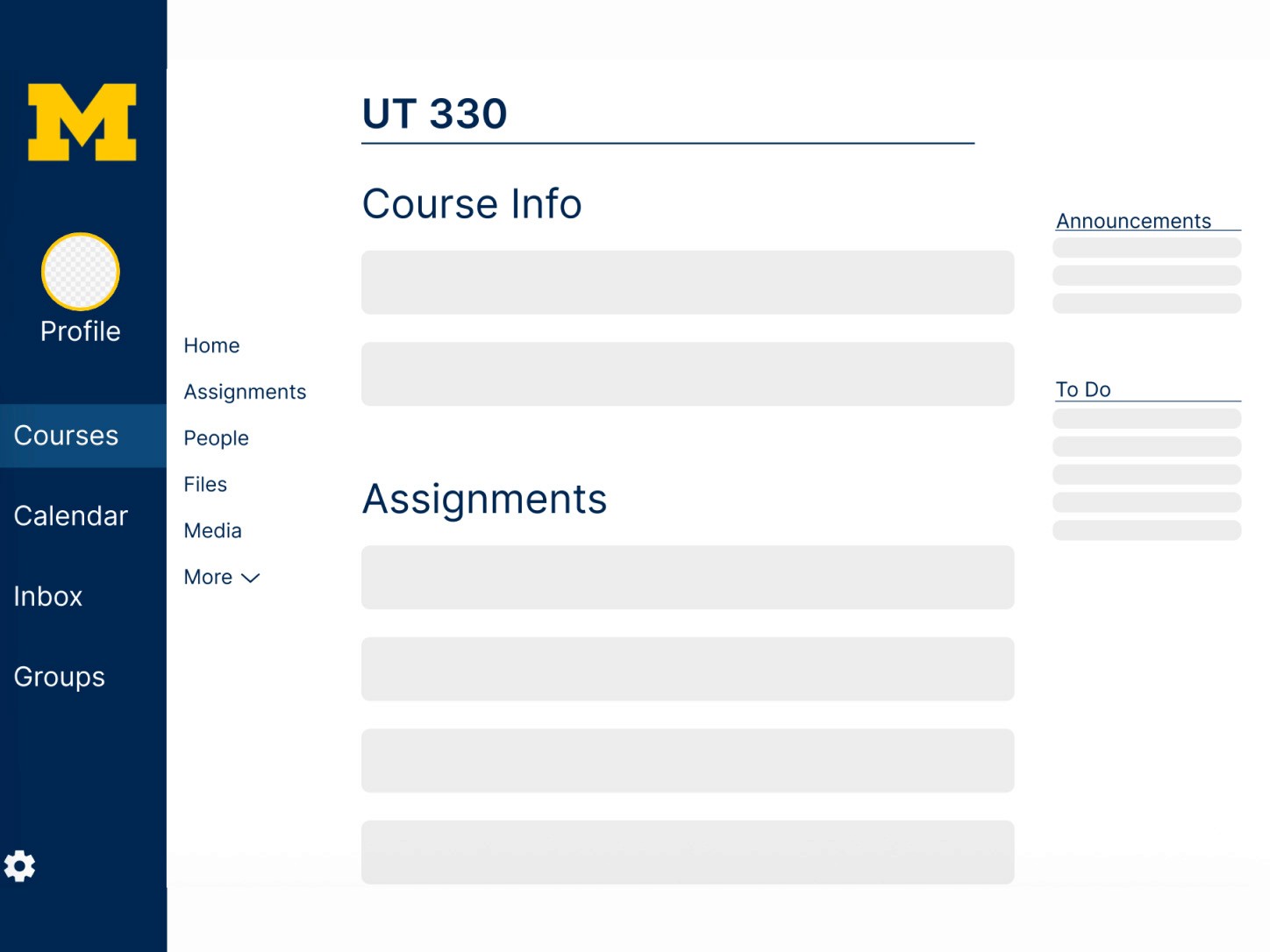
The starting goal was simple: observe how students complete the following task in the existing Canvas interface.
Navigate to the user profile
Add a bio and a link with the title “My Site”
Save the profile
Return to the UT330 course → People → user profile to confirm updates
Even within this seemingly straightforward task, early tests suggested that Canvas’ design introduces ambiguity around navigation, task completion, and system state.
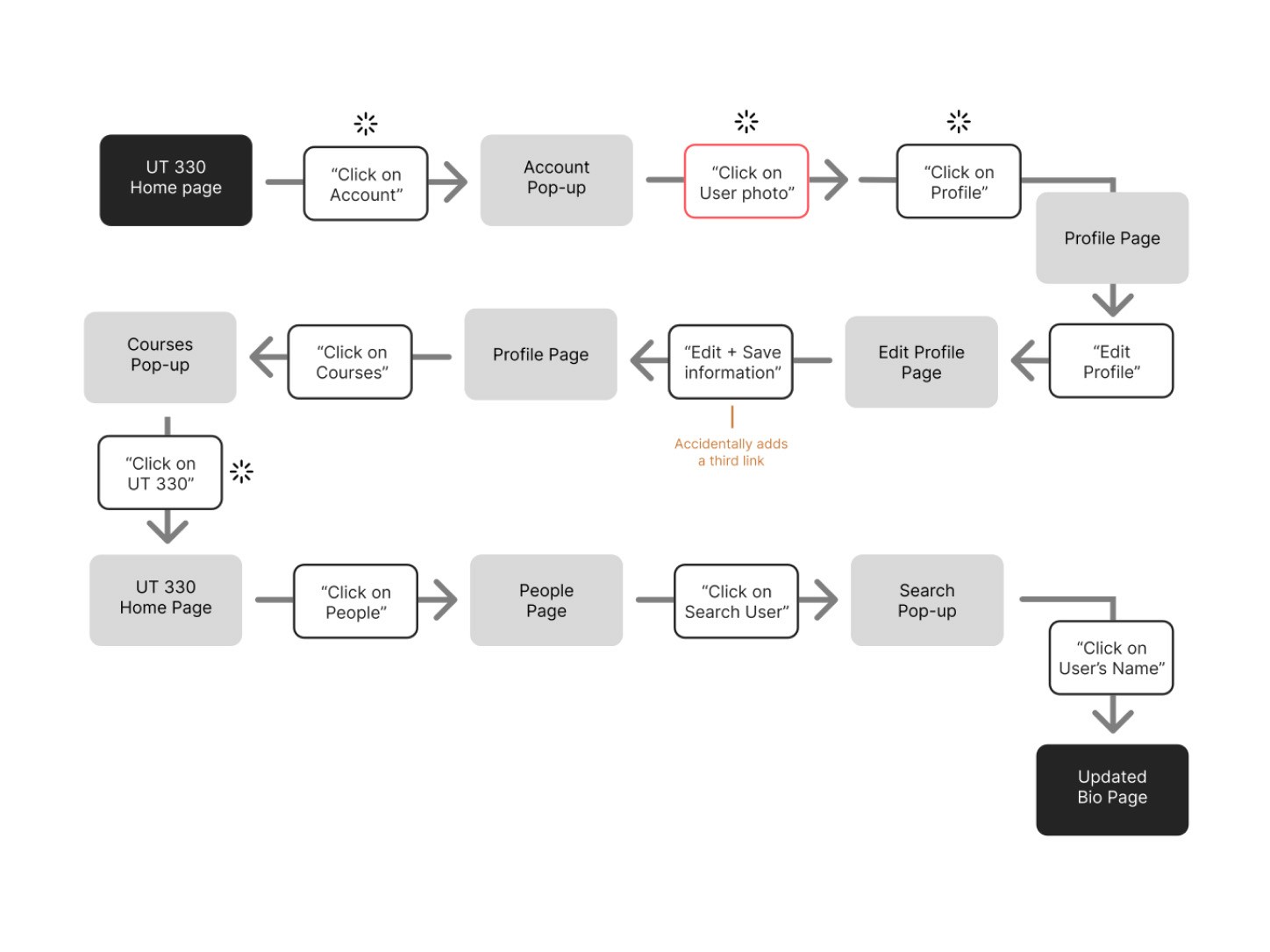
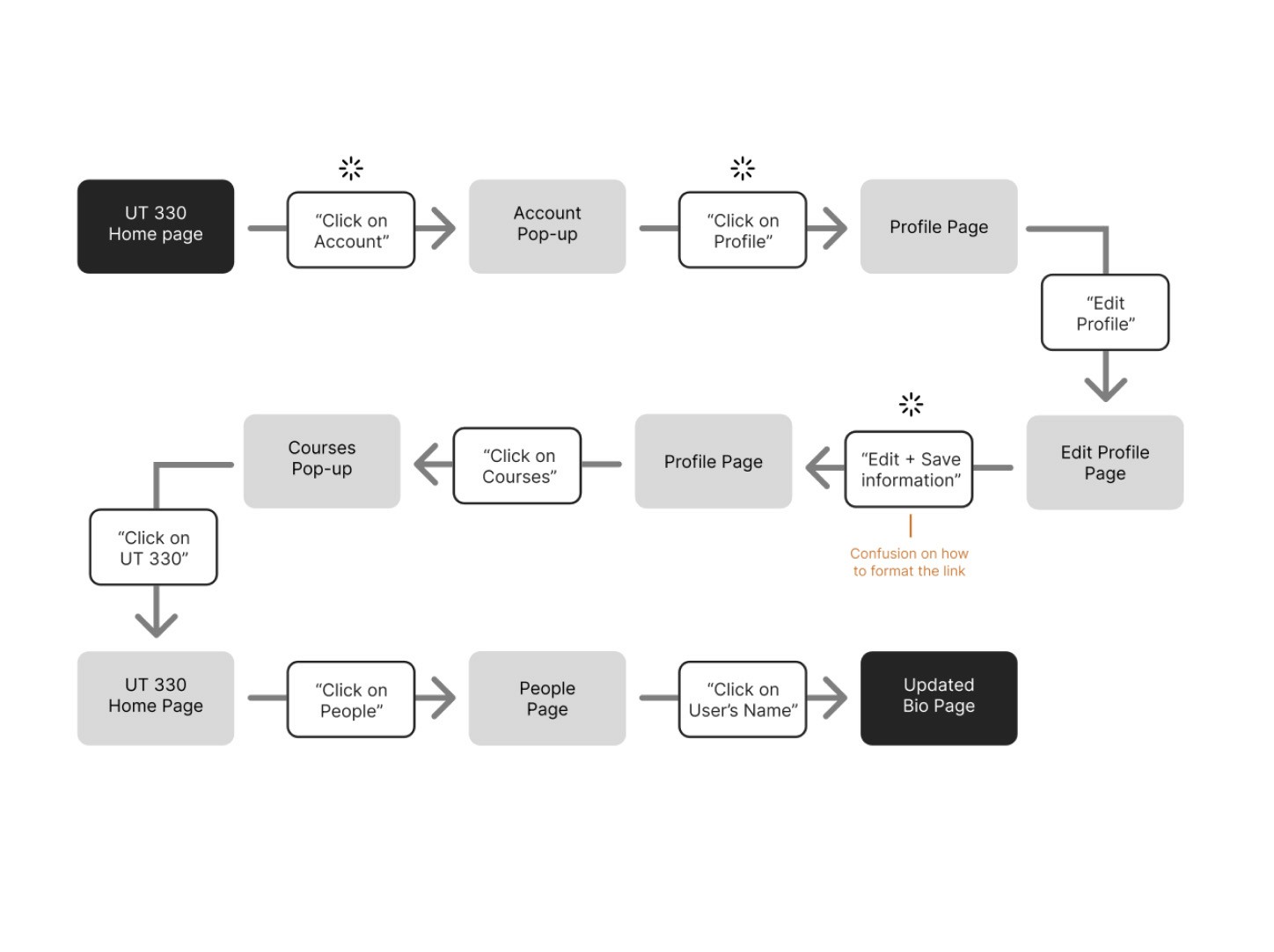
To test this, I conducted three think-aloud sessions with students outside the course. Each participant started on the UT330 course home page to simulate real-world use and avoid bias introduced by login or dashboard navigation.
Early Observations Across All Users
Users hesitated at identifying where their Profile lived
Ambiguity between “Account”, “Profile”, profile photo, and course-specific settings
Confusion around where to add links and how link “Title” vs. “URL” fields should be formatted
Some users navigated into courses mid-task, unsure which “Profile” page they had edited
Inconsistent continuation of the secondary sidebar menu confused users returning to UT330
These navigation inconsistencies created unintentional detours, misconceptions about editing mode, and unnecessary backtracking.
What this revealed:
Even a common, predictable task becomes error-prone when wayfinding and system status lack clarity.
Problem solving
Synthesizing think-aloud data allowed me to identify overlapping patterns and pain points across all three users.
Shared Pain Points
Unclear entry point to the profile
Users hovered over their image, clicked “Account,” or started guessing, indicating low information scent.Weak visibility of system status
The “Edit Profile” page looked visually similar to the view state, creating hesitation around whether users were actively editing.Link formatting confusion
All test users hesitated between the “Title” and “URL” fields.Navigation felt inconsistent
The secondary navigation (course nav vs. global nav) did not feel cohesive, causing users to occasionally exit their expected path.Lack of helpful scaffolding
No guiding text, prompts, or validation helped users understand expectations.
User Insights
User 1: Confusion formatting links; took indirect paths; difficulty distinguishing profile vs. course page
User 2: Felt secondary navigation “was not continuous”; unclear editing state
User 3: Added a third link accidentally; initially navigated using search instead of clicking their name
These insights shaped the redesigned task flow and interface.
Core UX Problems Identified:
Poor visibility of system status
Ambiguous navigation hierarchy
Weak affordances for editing
No error-prevention or link-format feedback
High cognitive load for a simple personal-update task
Implementation
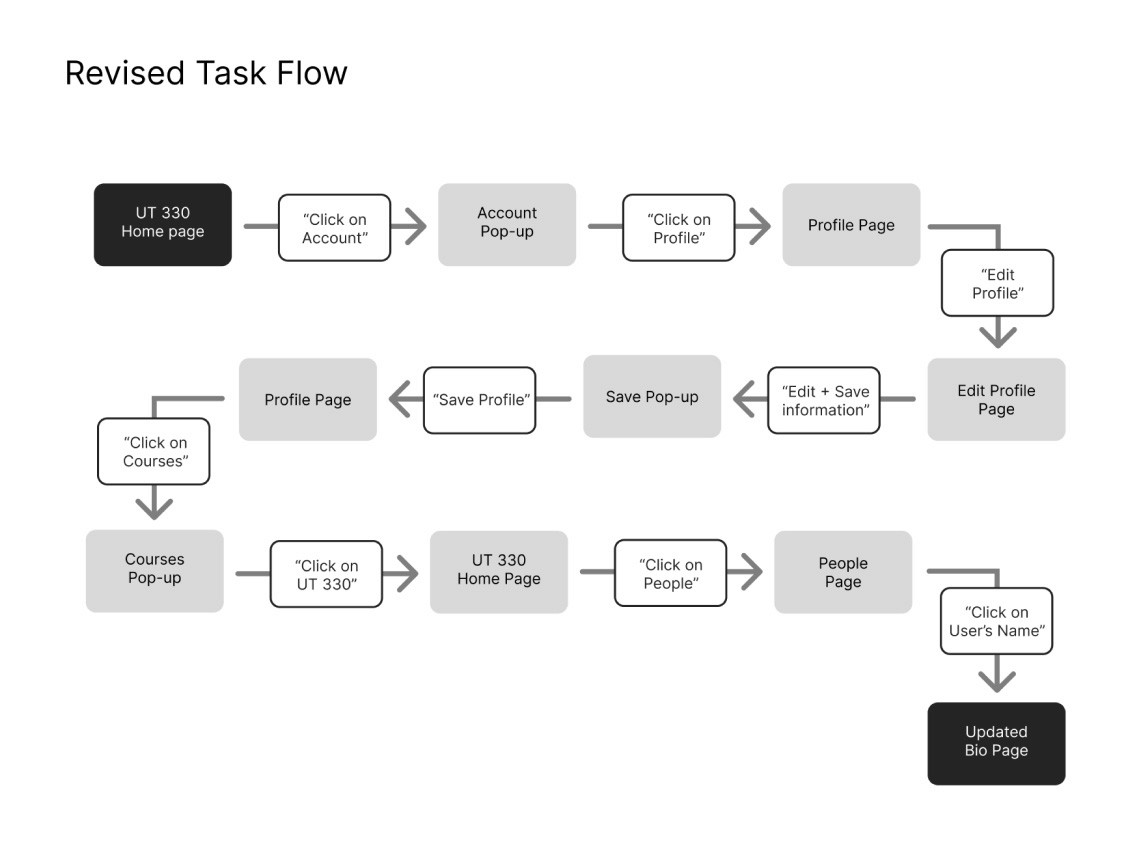
Guided by research and course constraints, I developed an improved task flow and redesigned wireframes that simplify the journey end-to-end. The redesign focused on clarity, hierarchy, and system feedback while honoring Canvas' functional ecosystem.
Redesigned Task Flow Highlights
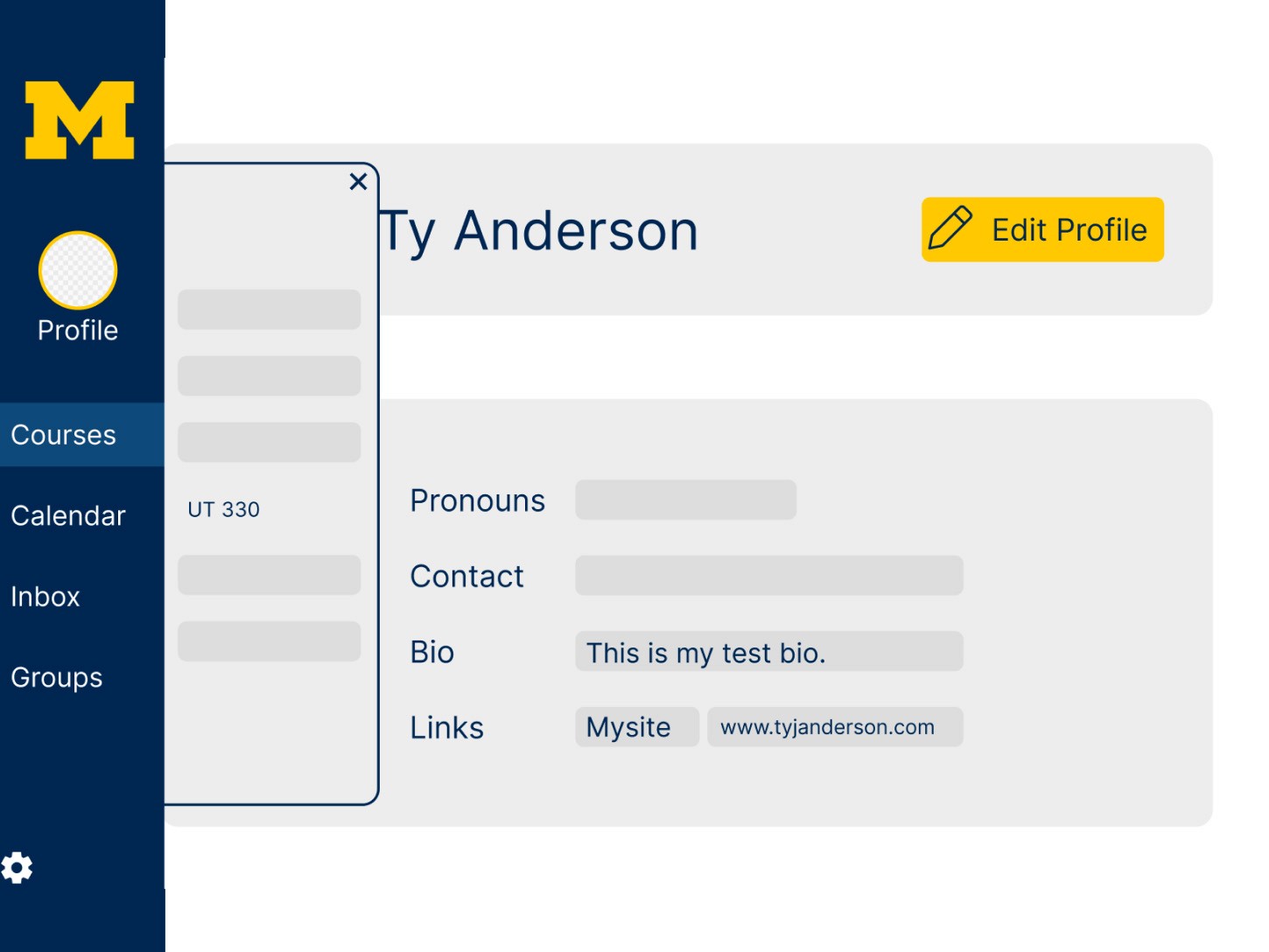
Profile access becomes immediate and unmistakable
“Profile” appears as a persistent top-level global-nav option rather than buried under “Account.”Clear “Edit Mode” state
A visually distinct edit state ensures users always know when they are editing vs. viewing.Guiding text in fields
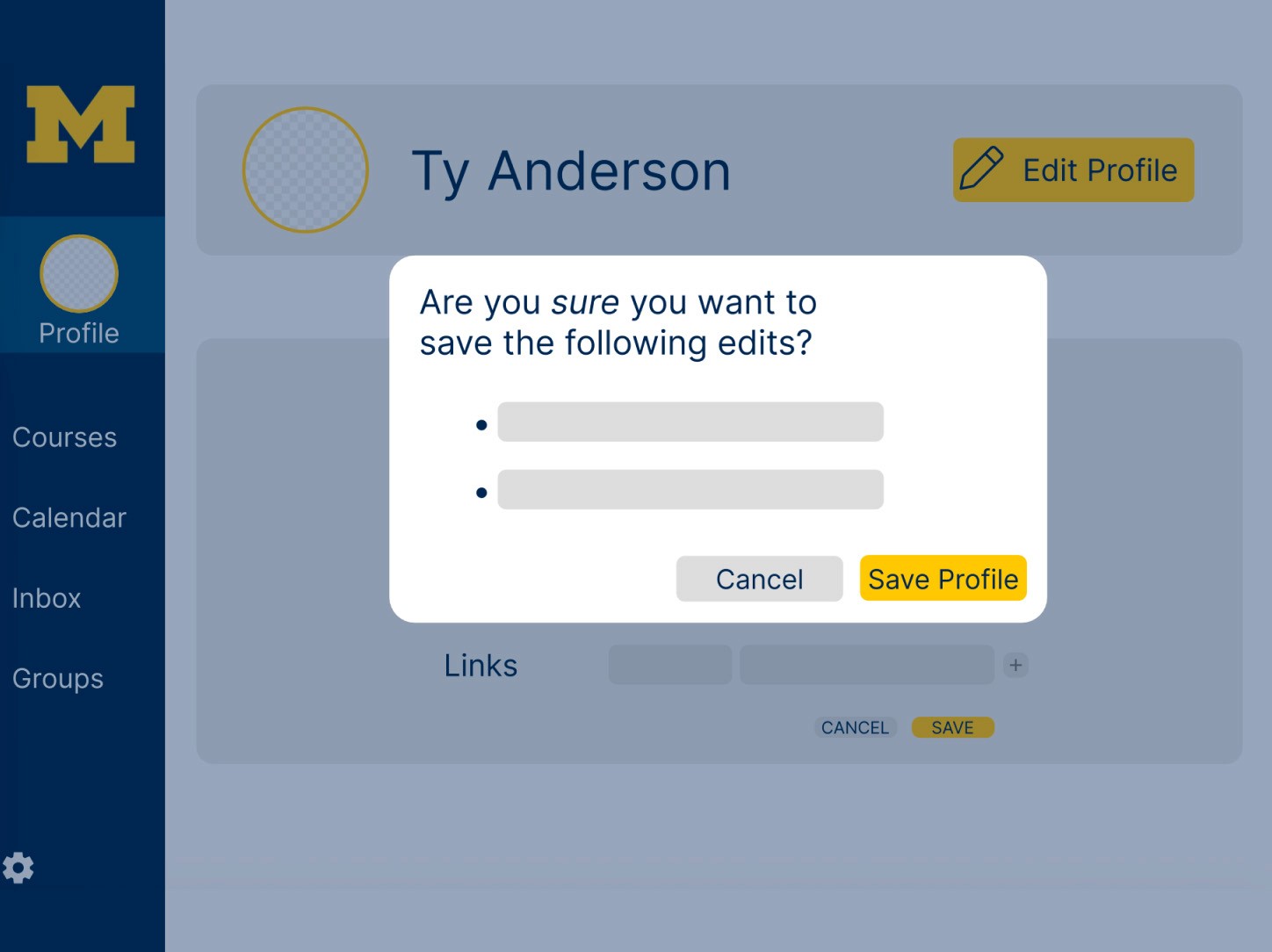
Examples (“e.g., https://…”) resolve confusion around formatting.Error prevention & confirmation modal
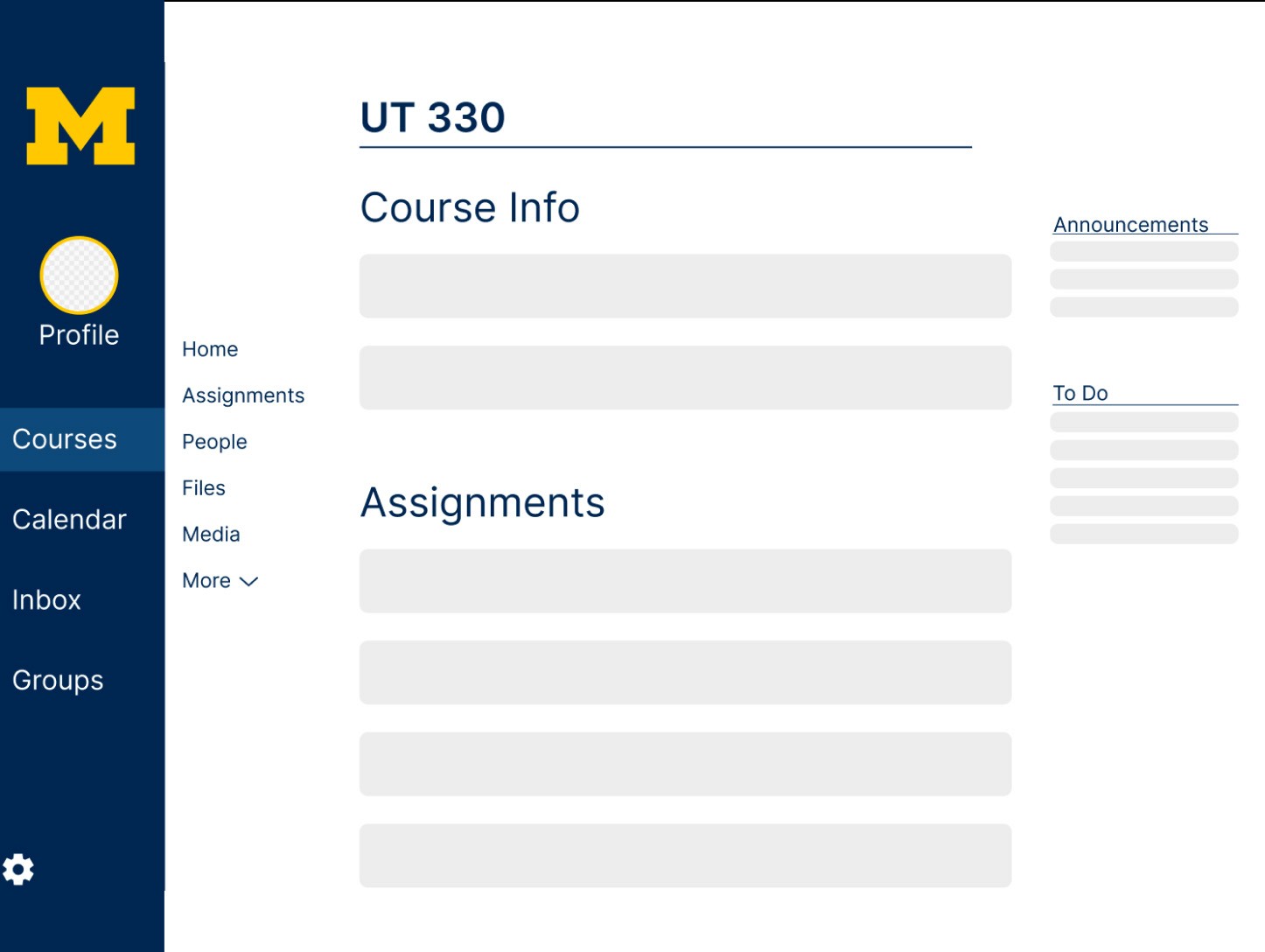
A required “Save Profile?” confirmation ensures no accidental edits.Consistent navigation panels
This prevents users from re-entering courses accidentally or feeling disoriented when returning.
Wireframe & Prototype Decisions
Design constraints reinforced clarity through minimal styling and clear affordances:
Greyscale + 2 hues for interactive elements
Solid backgrounds with state-specific indicators
No hover, no drag, no animation → every change must result from a user click
Reduced scrolling overall for People and Profile screens
Highlighted interactive elements (links, buttons, accordion sections)
Undo & destructive-action prevention integrated into flows
The prototype tested successfully with two new users, both completing the task faster and with fewer mistakes.
Key UX Improvements Demonstrated:
Stronger visual hierarchy
Explicit system status
Improved error prevention
Consistent navigation layout
Reduced decision fatigue
Results
The final redesign delivered a cleaner, more navigable, error-resistant experience for editing and viewing profiles in Canvas. User tests on the improved flow showed measurable improvements.
Key Outcomes
Faster time to complete the task across both test users
Zero errors or misdirected navigation, compared to multiple in the original tests
No confusion around link formatting thanks to guiding text
Immediate recognition of edit mode due to stronger visual cues
Higher confidence navigating back to UT330 → People → Profile
The redesign also aligns strongly with core usability heuristics, particularly Visibility of System Status, User Control and Freedom, and Error Prevention.
Reflections
This project strengthened my ability to conduct rapid iteration under constraints, transforming qualitative think-aloud insights into a tangible, testable, and improved task flow. It reinforced how even simple tasks benefit from clarity in navigation and consistent hierarchy, especially in multifunctional platforms like Canvas.